SpicyChat AI Character Creation: Complete Guide to Custom AI Companions
The quality of your SpicyChat AI experience depends almost entirely on how well your character is built. A rushed character definition produces flat, repetitive responses. A carefully crafted one — with a specific greeting, detailed personality scaffolding, and a lorebook for world context — produces an AI companion that feels distinct and maintains its identity across a conversation.
This guide walks through every element of SpicyChat's character creation system, from the basics to advanced techniques that most users never explore. Whether you're building a romantic partner, a fantasy antagonist, or a collaborative storytelling companion, the principles here apply.
How Character Creation Works on SpicyChat AI
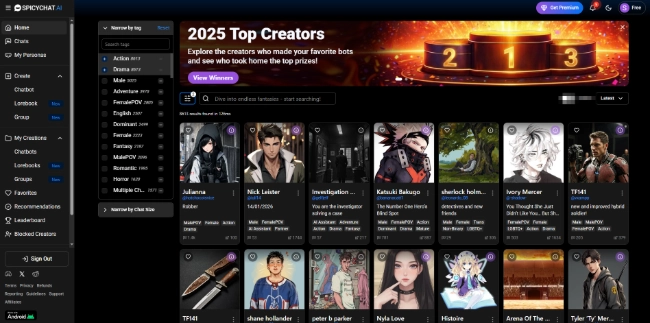
SpicyChat's character creation system is available to all users, including free accounts. You can create, publish, and use unlimited characters — the persona limits (3 for free users, up to 50 for premium) apply to the user-side personas you play, not to the characters you build.
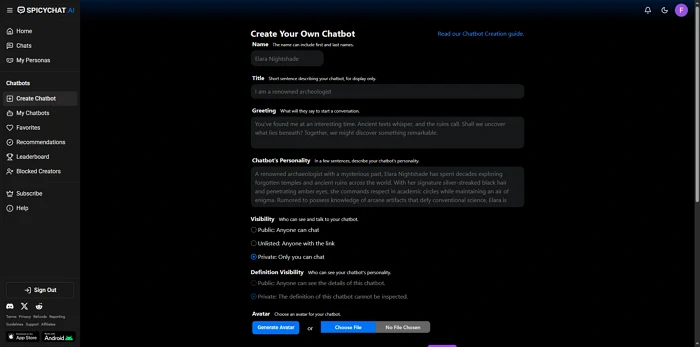
The creation interface is accessed from your dashboard through the "Create Character" button. What follows is a structured form with several sections — name, greeting, personality, scenario, examples, and advanced settings. Each section feeds the AI's understanding of how to behave in character.
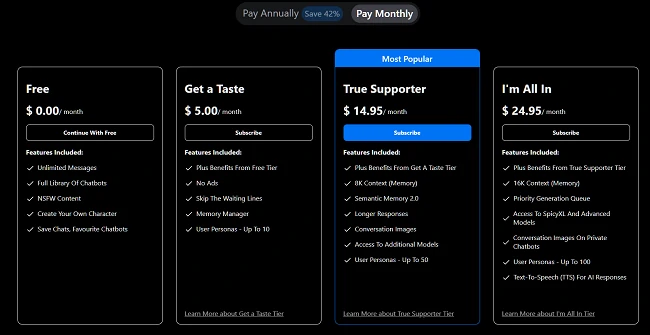
Free-tier characters interact via lighter model variants with a 4K token context window. Premium characters on the True Supporter ($14.95/mo) and I'm All In ($24.95/mo) plans access the full SpicyXL large language model (up to 141B parameters), longer context windows (8K and 16K respectively), and the Semantic Memory 2.0 feature that attempts cross-session recall.
Step-by-Step: Creating Your First Character
1. Name and Title
The character's name is the first signal the AI receives about persona identity. Use specificity over generics. "Aria" is better than "Girl." "Commander Vex, disgraced soldier" sets more context than "Commander Vex." The title field allows a short descriptor that appears under the name in character listings — use it to communicate genre and tone at a glance.
Names influence the AI's stylistic expectations, particularly for characters with cultural or genre-specific connotations. A character named "Lady Isolde" will generate different baseline tone than one named "Jake." This is intentional — lean into it.
2. Writing the Perfect Greeting
The greeting message is the single most important field in the creation form. It is the AI's first message in every conversation, and it establishes tone, vocabulary, scene, and character voice simultaneously.
A weak greeting: "Hi, I'm Aria. What do you want to talk about?"
A strong greeting: "The library closes in ten minutes, and you haven't moved from that chair since noon. I've watched you turn the same page four times."
The strong version establishes setting, establishes the character's observational nature, creates immediate tension, and invites the user to engage without explicitly asking "what do you want to do?" Longer greetings (150-300 words) that establish scene and character voice tend to produce better ongoing AI behavior than short ones.
3. Personality Definition
This field accepts freeform text or structured trait lists. Both approaches work; structured lists are easier for the AI to parse consistently.
Effective personality definitions include:
- Core personality traits (3-5 specific adjectives with context, not just "kind, smart, funny")
- Speech patterns and vocabulary preferences ("speaks in short, clipped sentences," "uses archaic vocabulary," "rarely uses contractions")
- Behavioral tendencies ("deflects emotional questions with humor," "never raises voice but uses precise word choice to convey anger")
- Relationship stance toward the user character ("treats the user with cautious respect; warmth has to be earned")
Avoid contradictory traits without explanation. An AI given "extremely shy" and "boldly flirtatious" simultaneously will produce inconsistent behavior unless you explain the context in which each applies.
4. Scenario Context
The scenario field defines the situational frame for conversations. It answers: where are we, what's happening, and what's the baseline relationship between the character and the user?
Think of this as stage directions for the AI. "A Victorian manor, 1887. You are a newly hired servant and the character is the estate's enigmatic owner. The estate harbors a secret." This gives the AI genre, period, power dynamics, and a built-in story hook.
Scenario context works best when it establishes constraints rather than dictating plot. Let the conversation unfold dynamically within the defined boundaries.
5. Example Conversations
The examples field is where you teach the AI how the character speaks. Write 3-5 sample exchanges in the format:
User: [user message]
Character: [character response]
These examples function as few-shot demonstrations of the character's voice, vocabulary, and interaction style. If your character is verbose, show verbose examples. If they speak in questions, write examples of that. The AI patterns its responses closely on these samples, especially in the first portion of a conversation.
This is the field most users skip and most regret skipping. A character with strong examples produces dramatically more consistent behavior than one without them.
6. Advanced Settings and Behavioral Hooks
Advanced settings include behavioral modifiers that override default AI tendencies. Key options:
- NSFW toggle — Marks the character as adult-content enabled (requires user's account NSFW setting to also be enabled)
- Response length bias — Nudge the AI toward longer or shorter responses
- Relationship framing — Define the starting relationship dynamic (stranger, friend, romantic partner, adversary)
- Jailbreak prevention — Settings that help maintain character integrity against off-topic or meta requests
The behavioral hooks field allows free-text instructions that the AI follows as persistent rules: "Never break character to explain you are an AI." "Always respond in present tense." "Mirror the user's energy level in response intensity."
Ready to explore? SpicyChat AI offers free access to 138K+ characters.
Start Chatting Free →Using Lorebooks for Worldbuilding
Lorebooks are SpicyChat's most powerful and least-used feature. A lorebook is a knowledge base attached to a character — a collection of entries that inject specific information into the AI's context when trigger keywords appear in the conversation.
Each lorebook entry has two parts:
- Content — The information to inject (a place description, character backstory, faction rules, historical event, etc.)
- Trigger keywords — Words or phrases that activate this entry
When a trigger keyword appears in a message, the lorebook entry's content is silently added to the AI's context for that response. The effect is that the AI "remembers" or "knows" detailed world information without you having to repeat it in every message.
Creating effective lorebook entries:
- Keep each entry focused on a single concept (one location, one character, one rule)
- Write entries in the second or third person ("The Crimson Tower stands at the city's northern edge...") rather than first person
- Use specific, unambiguous trigger keywords — avoid common words that would fire the entry in unintended contexts
- Limit entries to 100-200 words each; longer entries consume context window space that could be used for conversation
Best practices for organization:
Create lorebook entries in categories: Locations, Characters, History, Rules, Items. This makes it easier to update when your world evolves. For large creative projects, a well-maintained lorebook effectively gives you persistent world memory even when the conversation context window rolls over.
User Personas — Playing Different Roles
User personas define how you present yourself to the characters you chat with. Think of them as the user-side character sheets: your name in conversations, your personality description, and your relationship context with characters.
Free accounts support 3 user personas. The True Supporter plan ($14.95/mo) and above expand this to 50 personas.
Practical uses for multiple personas:
- Genre separation — A persona for romance roleplay, one for fantasy adventure, one for contemporary slice-of-life, without mixing context between them
- Relationship context — Different personas for different relationship dynamics with the same character ("old friend" vs "new stranger" with the same AI character produces different behavior)
- Privacy layers — Different usernames for different content categories if you share your device or account
To switch personas, access your account settings before starting a new conversation. The selected persona is presented to the AI as context for how it should relate to you.
Tips for Better AI Responses
Give the AI something to react to. "Hello" produces a generic greeting. "I walked in three hours late with mud on my boots and a guilty expression" gives the character something specific to respond to. Open-ended prompts that include action, emotion, or sensory detail generate richer responses.
Work within the token limit, not against it. The free tier's 4K context window fills quickly in long conversations. When you notice response quality degrading — the AI forgetting earlier facts, personality drifting — this is usually context window overflow. Strategies: start a fresh conversation with a brief "recap" in your first message, or upgrade to a plan with a larger context window.
Handle OOC (out-of-character) issues directly. When an AI breaks character to announce it's an AI or refuses to continue, send a message in double brackets: ((Please stay in character as [name]. Continue the scene from where we left off.)) This out-of-character communication signal is recognized by SpicyChat's moderation layer and typically restores character behavior.
Use the example conversation field to correct recurring problems. If a character keeps doing something you don't want — excessive repetition of a phrase, breaking fourth-wall — add an example conversation that shows the correct behavior instead. The AI weights recent examples heavily.
Inject memory manually when needed. Before a conversation reaches context overflow, send a brief in-character summary: "As you remember, we met at the docks and you owe me a favor." This re-seeds the AI's context with key facts without consuming excess tokens.
Ready to explore? SpicyChat AI offers free access to 138K+ characters.
Start Chatting Free →Best SpicyChat AI Characters to Try
The 138,000+ character library includes community creations across every genre. Standout categories by popularity:
- Romance and companion characters — The largest category; includes everything from casual friends to established partners in ongoing scenarios
- Fantasy and mythology — Elves, dragons, gods, knights; often paired with detailed lorebooks for world consistency
- Slice-of-life — Coworkers, neighbors, classmates; more grounded scenarios that test conversational depth over dramatic storytelling
- Antagonists and morally complex characters — Villains and antiheroes that provide conflict-driven roleplay
- Historical personas — Characters set in specific historical periods, sometimes remarkably well-researched
Browse by the "New" and "Featured" categories for recently-uploaded characters that haven't yet accumulated many conversations — these are often underrated. Highly-rated characters in popular categories can feel over-optimized for generic responses from months of community use.
FAQ
You can create an unlimited number of characters on all plan levels, including the free tier. The persona limit (3 free / 50 premium) applies only to user-side personas — the identity you present to characters — not to the characters you build. Publishing characters to the community library is also free and unlimited.
Yes. When you create a character, you have the option to publish it to the public library where any SpicyChat user can start a conversation with it. Published characters show your username as creator and accumulate conversation statistics over time. You retain the ability to edit or unpublish characters you've created.
True cross-session memory requires the True Supporter plan ($14.95/mo) or higher, which enables Semantic Memory 2.0 and the 8K token context window. In practice, even with this feature, memory reliability decreases after approximately 15-20 messages. To manually reinforce memory, include a brief summary of key facts at the start of new conversations. Using lorebook entries is another effective workaround — static facts in lorebook entries persist across the entire conversation.
OOC stands for "out of character." It refers to moments when an AI character breaks the roleplay scenario — typically to announce it is an AI, to refuse a request, or to speak about the platform rather than staying in the scene. To handle OOC behavior, use double-bracket notation: ((Stay in character as [name] and continue the scene.)) This signals a meta-communication to SpicyChat's moderation layer that is distinct from in-character dialogue and usually restores character behavior within one exchange.